
Browser Extension Alert Options |

|

|

|
||
|
Browser Extension Alert Options |
|
|

|

|
Browser Extension Alert Options
|
Browser Extension Alert Options |
|
|
|
||
|
Browser Extension Alert Options |
|
|
|
|
The main Trojan Remover scan checks all installed Browser Extensions. If an extension is identified as Malware an alert screen is shown. Clicking on the Details button will open the Malware Reference Database and provide details on the Malware, if they are available.
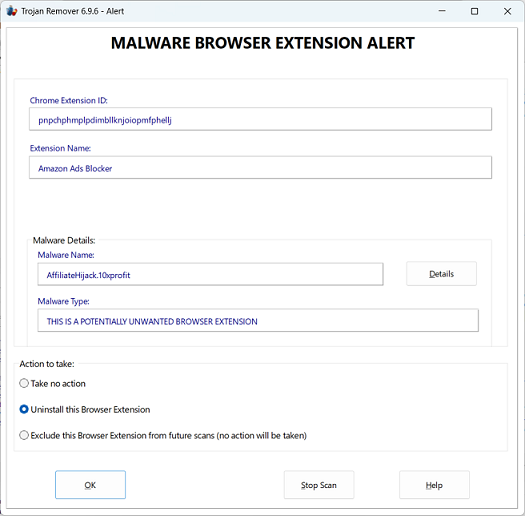
On this Alert screen you have the following options:
Take no action
The Browser Extension is left in place. Alerts will continue to be shown on each scan unless the Browser is excluded from scanning, or database changes lead to the detection no longer being made.
Uninstall this Browser Extension
The Browser Extension is removed if possible. Note that if Sync is enabled in the Browser then the Extension may be auto-reinstalled by the Browser. If this happens then you should manually uninstall the Extension using the Browser's own Extensions (or AddOns) settings menu.
Exclude this Browser Extension from future scans
No action will be taken on the Browser Extension. It will be excluded in future scans, although a note about the Browser Extension detection will be added to the logfile each time when a main Trojan Remover program scan is run.
Select the required option and click on the OK button.
Clicking on the Stop Scan button will stop the remainder of the scan. No Action will be taken on the Browser Extension.